



AI
影音视界
AI摘要
PeekPili(羊壳)是一款支持安卓、iOS及Windows的三端空壳影音播放器,需自行配置接口使用。本文详细介绍了其安装方法、三种核心接口添加方式(在线、本地JSON、PHP脚本)及TMDB配置技巧,并提供了包含点播、直播、小说和漫画在内的多个稳定接口源及一键导入JSON配置,帮助用户快速搭建个人影视库。

PeekPili(羊壳)是一款三端(安卓 /iOS/Windows)空壳影音播放器,需自行添加接口 / 脚本才能使用。
PP羊壳1.2.5终结版,支持通用md5在线接口源,搭配大包或是道长本地仓,还能解锁各种隐藏姿势
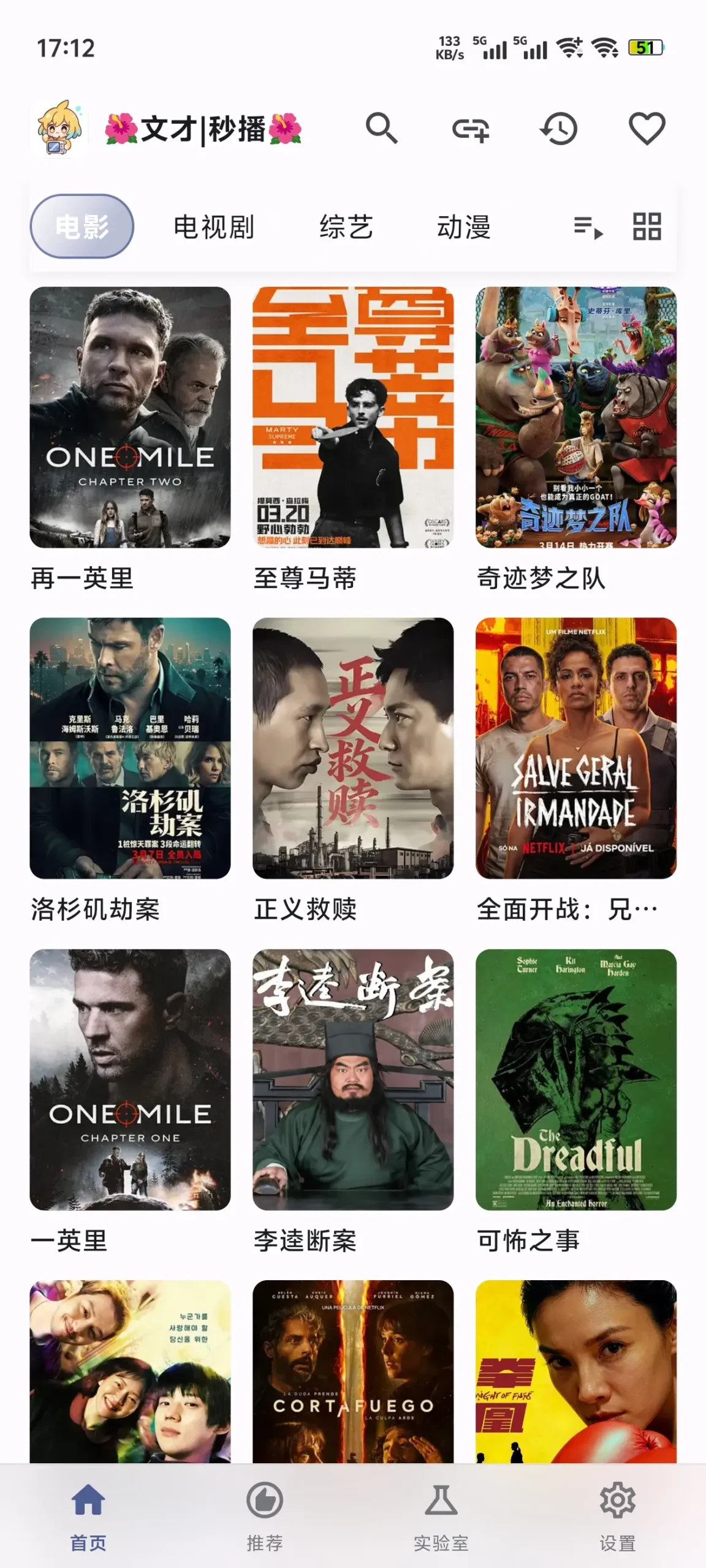
以下是完整使用教程:
一、安装与首次启动
- 安卓:安装 APK,开启 “未知来源应用” 权限;首次打开会创建
peekpili目录。 - iOS:用巨魔 / AltStore 安装 IPA,无需越狱。
- Windows:解压即用,内置 PHP 环境。
二、核心:添加接口(3 种方式)
1. 在线接口(简单,不稳定)
- 首页点右上角 + → 输入接口名称与链接(如 TVBox / 猫爪源)。
- 保存后切换接口即可浏览。
2. 本地 JSON 接口(推荐,稳定)
- 下载接口包(.json),放到手机 / 电脑任意目录。
- 点 + → 名称自定义 → 点地址栏右侧文件夹图标 → 选中.json 文件。
- 保存即可。
3. PHP 本地脚本(进阶,功能强)
- 安卓:
- 设置→实验室→安装 PHP(约 50MB)。
- 启动服务(默认端口 9980,显示 “运行中”)。
- 把.php 脚本放入
/storage/emulated/0/peekpili/php-scripts/。 - 添加 T4 源:设置→T4 源管理→+,配置示例:
json
{"key":"myphp","name":"本地PHP","type":4,"api":"http://127.0.0.1:9980/xxx.php","searchable":1}
- Windows:
- 脚本放入
程序目录\data\php\scripts。 - 启动服务,添加 T4 源(同安卓)。
- 脚本放入
4. drpy-node 本地包(道长包)
- 下载解压,文件夹重命名为
drpy-node。 - 放置:
- 安卓:
内部存储/peekpili/ - Windows:
peekpili-data/
- 安卓:
- 添加接口:
http://localhost:5757/config/1,重启应用。
三、TMDB 配置(提升影视详情)
- 注册TMDB,获取API 读访问令牌(eyj 开头)。
- PeekPili→实验室→TMDB 信息查询→粘贴令牌→选代理→显示 “已配置”。
- 效果:显示海报、演员、关联作品。
四、播放与使用
- 首页切换接口,用搜索框找内容。
- 进入详情页,选线路 / 画质,支持倍速、字幕、进度条快进。
- 历史记录自动保存播放位置。
五、常见问题
- 接口加载失败:重启应用、检查路径 / 权限、换接口。
- PHP 服务启动失败:安卓重新安装 PHP,Windows 检查端口占用。
- 无内容:确认接口有效、网络正常。
接口源
🎬 一、TVBox 通用接口(T3/T4,全平台通用)
1. 稳定推荐(优先用)
- 牛二源(含点播 + 直播)
plaintext
https://ghproxy.net/https://raw.githubusercontent.com/kebedd/TVBox/main/niuer.json状态:稳定 | 类型:T3 | 含 4K / 蓝光 / 直播
- 沐晨源(直连 + 多线路)
plaintext
https://ghproxy.net/https://raw.githubusercontent.com/muchendev/TVBox/main/muchen.json状态:稳定 | 类型:T3 | 无广告、线路多
- 道长聚合源(DrPy)
plaintext
https://ghproxy.net/https://raw.githubusercontent.com/kebedd/TVBox/main/drpy.json状态:稳定 | 类型:T4 | 适配 PeekPili T4 源
- PeekPili推荐接口:
- 安卓专用:
- Vox:
- http://rihou.cc:88/demo.php
- 摸鱼:
- https://6800.kstore.vip/fish.json
- 全端通用:
- 牛二猫源:
- http://wexfnw:wexfnw@ cat.xn--4kq62z5rby2qupq9ub.top/index.js.md5
- 牛二猫源2:
- https://9280.kstore.vip/cat/index.js.md5
- 雪乃猫源:
- https://raw.githubusercontent.com/Darklessing/catvod/refs/heads/main/xuenai/index.js.md5
- 沐辰:
- https://raw.githubusercontent.com/4TVBox/Cat/refs/heads/main/index.js.md5
- 1.牛二猫源 https://9280.kstore.vip/cat/index.js.md5
- github备份(兜底使用,需要代理)
- https://raw.githubusercontent.com/git8477/wexfnw/refs/heads/main/index.js.md5
- 通用接口(猫影视/猫爪可用) http://wexfnw:wexfnw@ cat.xn--4kq62z5rby2qupq9ub.top/index.js.md5
- 2.雪乃猫源 国内免翻
- https://ghfast.top/https://raw.githubusercontent.com/Darklessing/catvod/refs/heads/main/xuenai/index.js.md5
- 需要代理
- https://raw.githubusercontent.com/Darklessing/catvod/refs/heads/main/xuenai/index.js.md5
- 3.Lmentor猫源 国内免翻
- https://ghfast.top/https://raw.githubusercontent.com/Darklessing/catvod/refs/heads/main/lmentor/index.js.md5
- 需要代理
- https://raw.githubusercontent.com/Darklessing/catvod/refs/heads/main/lmentor/index.js.md5
- 4.豆儿猫源 国内免翻
- https://ghfast.top/https://raw.githubusercontent.com/Darklessing/catvod/refs/heads/main/douer/index.js.md5
- 需要代理
- https://raw.githubusercontent.com/Darklessing/catvod/refs/heads/main/douer/index.js.md5
- 5.沐辰猫源 只适用于MiraPlay 国内免翻
- https://ghfast.top/https://raw.githubusercontent.com/4TVBox/Cat/refs/heads/main/index.js.md5
- 需要代理
- https://raw.githubusercontent.com/4TVBox/Cat/refs/heads/main/index.js.md5
2. 备用测试(不稳定时换)
https://8815.kstore.vip/tvbox/Ace
- 备用 1:
https://cdn.jsdelivr.net/gh/kebedd/TVBox@main/niuer.json - 备用 2:
https://fastly.jsdelivr.net/gh/muchendev/TVBox@main/muchen.json - 备用 3:
https://ghproxy.net/https://raw.githubusercontent.com/xx007/TVBox/main/xx007.json
📺 二、直播源接口(看电视台)
- IPTV 直播源(央视 + 卫视 + 地方台)
https://ghproxy.net/https://raw.githubusercontent.com/kebedd/TVBox/main/live.json状态:稳定 | 含高清 / 标清线路
- 港澳台直播源(测试)
https://ghproxy.net/https://raw.githubusercontent.com/muchendev/TVBox/main/live_hk.json状态:测试 | 部分地区需网络优化
📚 三、小说 / 漫画源(PeekPili 新增功能)
- 小说源(全网小说)
https://ghproxy.net/https://raw.githubusercontent.com/kebedd/TVBox/main/novel.json - 漫画源(国漫 + 日漫)
https://ghproxy.net/https://raw.githubusercontent.com/muchendev/TVBox/main/manhua.json
🛠️ 四、添加接口步骤(快速上手)
- 打开 PeekPili → 首页右上角 +
- 名称自定义(如 “牛二源”)
- 粘贴上方接口链接 → 保存
- 首页切换接口,即可浏览 / 搜索内容
⚠️ 重要提示
- 接口可能因网络 / 政策失效,优先用ghproxy.net镜像链接(国内访问更稳)
- 若加载失败:重启应用、切换网络、换备用接口
- 建议搭配TMDB 配置(教程见上一轮),影视详情更完整
我现在直接给你现成的一键导入 JSON,你复制下面这段完整文本,保存成
.json 文件,丢进羊壳 PeekPili 就能一键导入所有源。羊壳 PeekPili 一键导入接口 JSON
复制下面全部内容,新建文本文档,粘贴进去,后缀改成 .json,然后在羊壳里导入即可:
{
  "sources": [
    {
      "name": "牛二源·点播+直播",
      "url": "https://ghproxy.net/https://raw.githubusercontent.com/kebedd/TVBox/main/niuer.json",
      "type": 3
    },
    {
      "name": "沐晨源·多线路高清",
      "url": "https://ghproxy.net/https://raw.githubusercontent.com/muchendev/TVBox/main/muchen.json",
      "type": 3
    },
    {
      "name": "道长聚合T4源",
      "url": "https://ghproxy.net/https://raw.githubusercontent.com/kebedd/TVBox/main/drpy.json",
      "type": 4
    },
    {
      "name": "全网直播源·央视卫视",
      "url": "https://ghproxy.net/https://raw.githubusercontent.com/kebedd/TVBox/main/live.json",
      "type": 3
    },
    {
      "name": "测试·港澳台直播",
      "url": "https://ghproxy.net/https://raw.githubusercontent.com/muchendev/TVBox/main/live_hk.json",
      "type": 3
    },
    {
      "name": "全网小说源",
      "url": "https://ghproxy.net/https://raw.githubusercontent.com/kebedd/TVBox/main/novel.json",
      "type": 3
    },
    {
      "name": "国漫日漫源",
      "url": "https://ghproxy.net/https://raw.githubusercontent.com/muchendev/TVBox/main/manhua.json",
      "type": 3
    }
  ]
}
导入方法(超简单)
- 把上面内容复制 → 新建文本文件 → 粘贴 → 重命名为:peekpili_sources.json
- 打开羊壳 PeekPili
- 首页右上角 + → 选择 本地文件 / 导入 JSON
- 选中这个文件 → 确定
- 所有接口一次性全部导入
下载地址:
© 版权声明
1、本网站名称:OK软件
2、本站永久网址:https://ooook.cn
3、本站文章内容可能来源于网络,仅供大家学习与参考,如有侵权,请联系Q/V:775182000。
4、本站一切资源不代表本站立场,并不代表本站赞同其观点和对其真实性负责。
5、本站一律禁止以任何方式发布或转载任何违法的相关信息,访客发现请向站长举报。
6、本站资源大多存储在云盘,如发现链接失效,请告诉我们,我们会第一时间更新。
THE END















- 最新
- 最热
只看作者